

Generate a key
API keys are part of the Scale plan, and only workspace admins and the owner can create or revoke them.
1
Open API keys
Sign in to the dashboard and go to Settings → Developer → API keys.
2
Name the key and pick its permissions
Give it a name that says where it’ll be used (e.g.
production-backend) and tick the permissions it needs. New keys start with Read and Calls ticked.3
Create and copy it
Click Create key and copy it straight away — it’s shown once and never again.
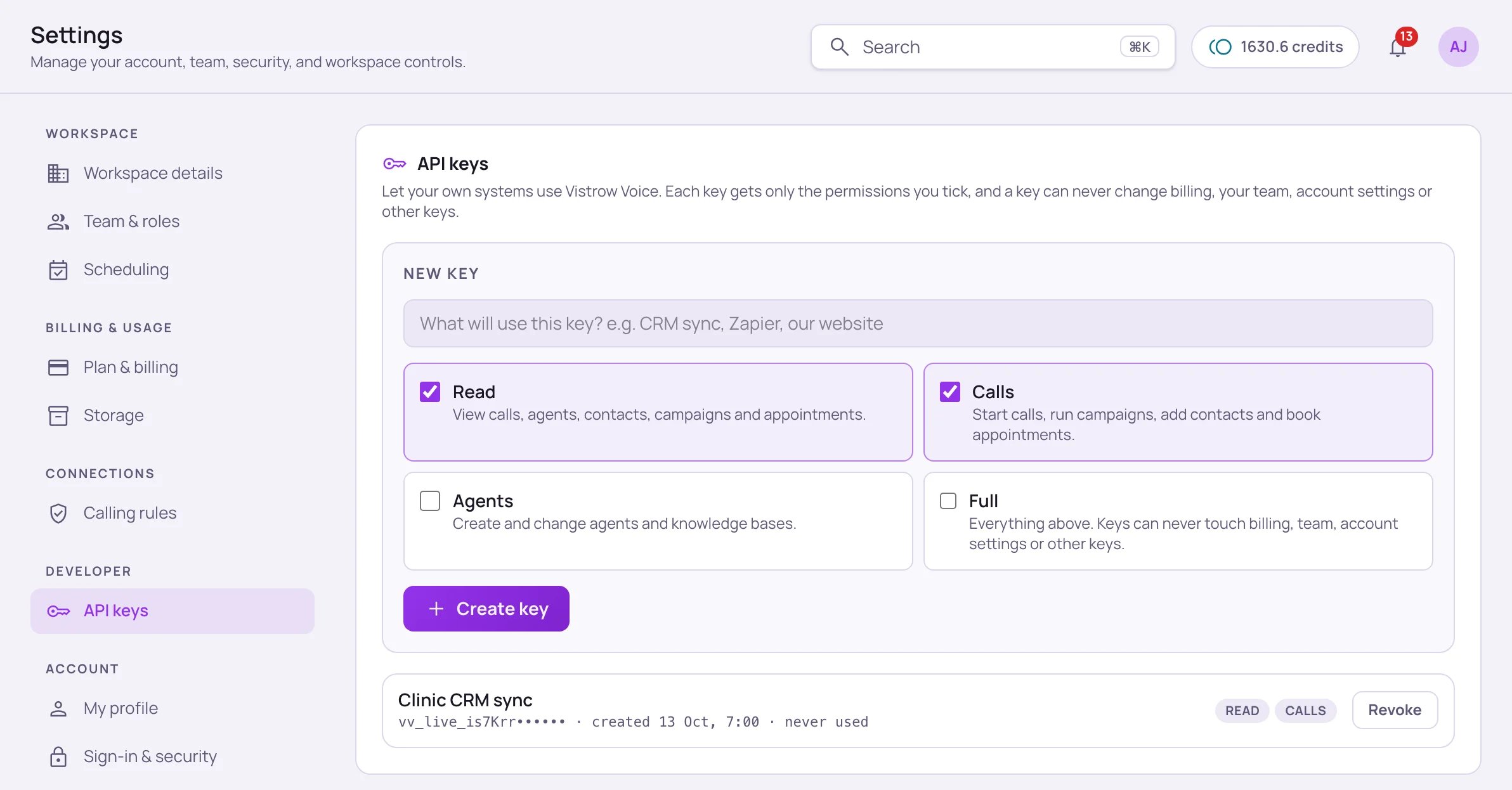
Settings → Developer → API keys. After creation only the start of a key is shown, with its permissions and a Revoke button.
Permissions
Even a Full key can never reach billing, your team, your profile, sign-in, or other API keys. Those stay in the dashboard.
Authenticate a request
Send the key in theX-Api-Key header on every request. No other header or query parameter is needed.
Scope
A key belongs to the workspace that created it. Every request made with it sees only that workspace’s data, limited to the permissions you gave the key — nothing from any other account.API Reference
See every endpoint you can call with a key.